


Bingo Pop: Play Live Online
4.644.20K Reviews
App Specs
- Version
- 12.15.7
- Updated On
- License
- Free
- Downloads
- 10,000,000+
- Developer
- Jam City, Inc.
- Categories
- Board
- Platform
- Android, iOS
Screenshots




 Analysis by AppCompare
Hey there, fellow gamers! Have you ever found yourself craving a little bit of that Las Vegas vibe without leaving the comfort of your couch? Well, let me introduce you to Bingo Pop: Play Live Online. As someone who's always on the lookout for a fun and engaging app, I couldn't resist diving into this one. So, let's take a trip together into the world of virtual bingo and see what Bingo Pop: Play Live Online has in store for us!
Where the early goals make a difference
What gives a bingo game staying power is not just the moment a number is called; it is having a reason to pay attention from one round to the next. In Bingo Pop, the appeal is the combination of familiar card play with bonuses and changing challenges. I find that works best when I treat each round as a small decision: enjoy the calls, keep track of the card, and use any available boost when it can actually help rather than tapping it the instant it appears.
That approach also makes the game easier to fit into ordinary downtime. A short break can be enough for a round, while a longer wait can turn into several. I would not open it expecting a deep board-game campaign or a story to follow; its draw is the quick rhythm of bingo, with extra layers that give repeat play a goal beyond simply filling a card. If you prefer clear, compact sessions, that’s a good fit. If you need a long strategic puzzle with a finish line, a traditional strategy board game will probably suit you better.
Reading progress without rushing
Progress feels most satisfying when I notice what a bonus or challenge is asking me to do and then play with that in mind. Rather than chasing every reward at once, I recommend picking one immediate aim for a session. That keeps the calls from becoming background noise and makes it easier to judge whether a power-up is useful now or better saved for a later opportunity. The trade-off is that this style rewards attention; playing while distracted can make the extra goals feel like clutter instead of direction.
For a realistic everyday example, I might open the game while waiting for a meal to cook, play a round, and stop when the timer or the next task in my evening needs attention. The format is convenient for that kind of pause because bingo is easy to understand without a tutorial-heavy learning curve. Still, I would avoid starting a session when I know I have only a few seconds: calls arrive in sequence, and a rushed exit can make a relaxing game feel like one more thing to manage.
First Impressions and Getting Started
When I first downloaded the app, I was greeted by vibrant graphics that really pop (pun intended). The interface is intuitive, making it super easy for anyone to jump right in. Whether you're a bingo newbie or a seasoned pro, the app welcomes you with open arms. Getting started is a breeze—you just need to sign up or log in, and you're ready to roll those bingo balls.
The Gameplay Experience
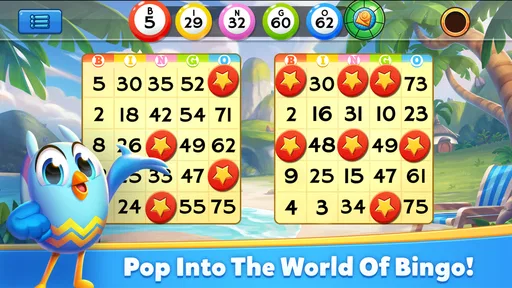
Once you're in, the real fun begins. What I love about Bingo Pop is the variety of rooms and themes. From classic bingo halls to more exotic settings, each room has its own unique charm. The pace is just right, keeping you engaged without feeling overwhelmed. The auto-daub feature is a lifesaver for those moments when you just want to sit back and enjoy the game without worrying about missing a number.
Worth Reading Before You Choose

EA SPORTS FC Mobile 26 Is a Bigger Football Game, but It Takes Time

Flipboard Shows What News Apps Must Do Beyond the Feed

Switching to Android Auto Means Rethinking Your Driving Routine

Google Calendar Makes a Crowded Week Easier to Manage

Ludo King Makes the Most of the Minutes Between Plans

Baby Panda World Brings Quick Play to Modern Phones, but Its Game Library Feels Busy
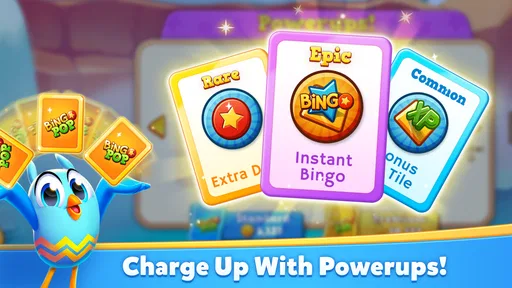
Now, let's talk about the power-ups. These nifty little boosts add an extra layer of excitement to the game. Whether it's extra coins, free daubs, or other bonuses, they keep you on your toes and eager for the next round. Trust me, scoring a power-up at the right moment can make you feel like a bingo superstar!
Choosing a pace that suits you
Auto-daub makes a practical difference if you want to follow the calls without manually marking every number. I would use it when I’m relaxing or splitting my attention, but I would not assume it removes every reason to stay engaged: watching the round and deciding how to use boosts still shape the experience. If you enjoy the tactile routine of marking each call yourself, manual play may feel more involved; if that routine is the part you find tiring, auto-daub lowers the effort.
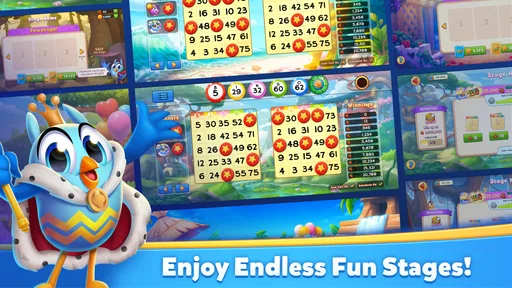
The game’s rooms and themes give the familiar bingo format a bit of variety, though they do not turn it into a different genre. That is useful for someone who likes the same basic activity with a change of setting, but less compelling for a player who wants every session to introduce a new kind of strategy. I’d think of the themed rooms as a way to keep the presentation fresh, not as a promise that each one demands a completely different skill set.
Social Features and Community
One of the highlights of Bingo Pop: Play Live Online is its social aspect. You can connect with friends, join teams, and even chat with other players. It’s a fantastic way to meet new people who share your love for bingo. The app also hosts events and tournaments, which adds a competitive edge to the game. Nothing beats the thrill of climbing the leaderboard and earning those bragging rights.
What the competition adds—and what it doesn’t
For me, social play is most appealing when I want a light shared activity rather than a serious contest. Teams, chat, and tournaments can give a round a communal feel, while the underlying bingo remains simple enough for newcomers to follow. If you’re inviting a friend who has never played, the familiar rules make it easier to join in than a complex multiplayer board game. On the other hand, someone seeking direct tactical duels or a highly skill-driven ranking system may find a conventional competitive board game more rewarding.
It also helps to decide before joining a session whether you want to chat or simply play. Conversation can make the experience warmer, but it may distract from calls and goals if you are trying to focus. I’d keep the social side optional: enjoy it when you want company, and don’t feel that you have to turn every round into a community event. That flexibility is one of the better reasons this can work for both solo downtime and casual play with others.
Visuals and Soundtrack
Let's not forget about the aesthetics! The visuals are colorful and engaging, perfectly capturing the lively spirit of a bingo hall. The animations are smooth, and the attention to detail is impressive. As for the soundtrack, it's upbeat and catchy, complementing the gameplay without being distracting. It’s like having your own little bingo party wherever you go.
Keeping the session comfortable
Because the presentation is lively, I’d adjust how I play to the setting rather than assume every moment is the right one for sound and animation. A quick session at home can feel cheerful with the soundtrack on; in a quiet waiting room, I’d keep the experience discreet and focus on the screen. The bright style supports the casino-like mood, but players who prefer restrained visuals or a calm, minimalist board may find it busier than they want.
Another useful habit is to decide on a stopping point before starting. Bingo’s steady calls and the prospect of another challenge can make “one more round” tempting. Setting a simple boundary—one short break, or playing only until you need to return to what you were doing—keeps the game in the role of a pastime instead of letting it absorb an entire evening. That is especially helpful if you enjoy the social competition and tend to stay for the next event.
Monetization and In-App Purchases
While the game is free to play, it does offer in-app purchases. These can enhance your gaming experience, but they're not necessary to enjoy the game. I appreciate that the app doesn't push purchases too aggressively. You can earn plenty of rewards just by playing regularly, which is a big plus in my book.
Spending, patience, and the difficulty curve
The game is free to download, but purchases are available, with individual items ranging from $0.99 to $399.99. That wide range is a reason to be deliberate, not a reason to assume you need to buy anything. I’d start by playing without spending and see whether the natural pace feels satisfying. If progress begins to feel slow, first consider whether you are playing for the calls themselves or mainly chasing the next unlock; paying to speed up a loop you do not enjoy rarely fixes the underlying problem.
As with many games built around repeat rounds and rewards, the challenge can feel different depending on what you want from it. A casual player may appreciate a low-pressure way to spend a few minutes, while someone intent on advancing quickly may feel more friction when rewards take patience. I would not treat every challenge as an obligation. Choosing a manageable goal and taking breaks helps keep the difficulty from turning into pressure, especially when a competitive event makes it tempting to keep going longer than planned.
Parents should also note that the game is rated Teen. That makes it worth checking whether its social and purchase elements fit the person who will be playing, and setting purchase expectations in advance on a shared device. The game’s simple bingo rules may look family-friendly at first glance, but the age rating and optional spending are still useful context when deciding whether it is appropriate for a younger player.
Who will enjoy this particular kind of bingo
I’d recommend it to people who already like bingo, want a familiar game with a more colorful presentation, or enjoy pairing simple play with social features and light goals. It can also suit someone who wants an easy activity to pick up during a quiet stretch without learning a complicated ruleset. Jam City, Inc. is the developer, and the game has reached over 10 million installs, which reflects its broad audience; its average rating is 4.6 from around 297,000 ratings.
I’d be more cautious if you dislike in-app purchase offers, prefer games with no ongoing reward pressure, or want a board game where every move depends on careful planning. Compared with plain, traditional bingo, this version adds rooms, boosts, and social competition, which can make repeat sessions livelier but also gives you more prompts to keep playing. A stripped-back bingo app is the better choice if you want only cards and calls; a strategy game is better if you want decisions to matter more than timing and luck.
Final Thoughts
In conclusion, Bingo Pop: Play Live Online is a delightful app that brings the joy of bingo to your fingertips. Whether you're looking to kill some time or dive into a competitive bingo marathon, this app has something for everyone. The community aspect, combined with its engaging gameplay and vibrant visuals, makes it a must-try for any bingo enthusiast.
So, why not give it a shot? Download Bingo Pop: Play Live Online and let the bingo adventures begin. You might just find yourself a new favorite pastime. Happy bingo-ing!
My progression verdict
My overall take is that its progression works best as gentle motivation around a straightforward bingo session, not as a demanding ladder that should dictate your free time. The early goals can make a round feel purposeful, and boosts give you occasional choices, but the core appeal remains the easy-to-follow calls and the chance to play socially. I’d enjoy it in short visits, keep spending optional, and step away when the next goal starts feeling like a chore.
The game is free, rated Teen, and runs on Android 6.0 or later; its current version is 12.1.9. It first appeared on September 24, 2014, and has gathered around 44,000 written reviews alongside its ratings. Those details are useful when checking whether it fits your device and expectations, but the decision is simple: try it if colorful, social bingo sounds relaxing, and choose a quieter or more strategic alternative if you want fewer prompts, less competition, or deeper control over each move.
Pros
- Engaging live multiplayer features.
- Variety of themed bingo rooms.
- Frequent updates with new content.
- User-friendly interface for easy navigation.
- Offers daily bonuses and rewards.
Cons
- Requires a stable internet connection.
- In-app purchases can be costly.
- Some ads between games can be intrusive.
- Limited offline play options.
- Progression can be slow without purchases.
FAQs for Bingo Pop: Play Live Online
What is Bingo Pop: Play Live Online?
Bingo Pop: Play Live Online is a mobile game that brings the excitement of classic bingo to your fingertips. It features live online play, allowing you to compete with players worldwide in real-time. The game is available on both Android and iOS platforms and offers various themed rooms and power-ups to enhance the gaming experience.
Is Bingo Pop free to play, and are there in-app purchases?
Bingo Pop is free to download and play. However, it includes in-app purchases that allow players to buy additional coins, power-ups, and other virtual items to enhance gameplay. While these purchases can enhance your experience, they are entirely optional, and you can enjoy the game without spending real money.
What features does Bingo Pop offer to enhance gameplay?
Bingo Pop offers several features to make the game more engaging. These include themed bingo rooms, daily rewards, and special events. Players can also use various power-ups to increase their chances of winning. The game’s vibrant graphics and interactive elements contribute to an immersive bingo experience.
Can I play Bingo Pop without an internet connection?
Bingo Pop is primarily an online game, requiring an internet connection to access its live multiplayer features. While some aspects of the game may be accessible offline, such as certain single-player modes, the full experience, including live matches and events, requires a stable internet connection.
How can I ensure my progress is saved in Bingo Pop?
To ensure your progress is saved, it's recommended to connect Bingo Pop to your Facebook account or another available social media platform. This allows your game data to be backed up online, enabling you to restore your progress even if you switch devices or uninstall the app.


